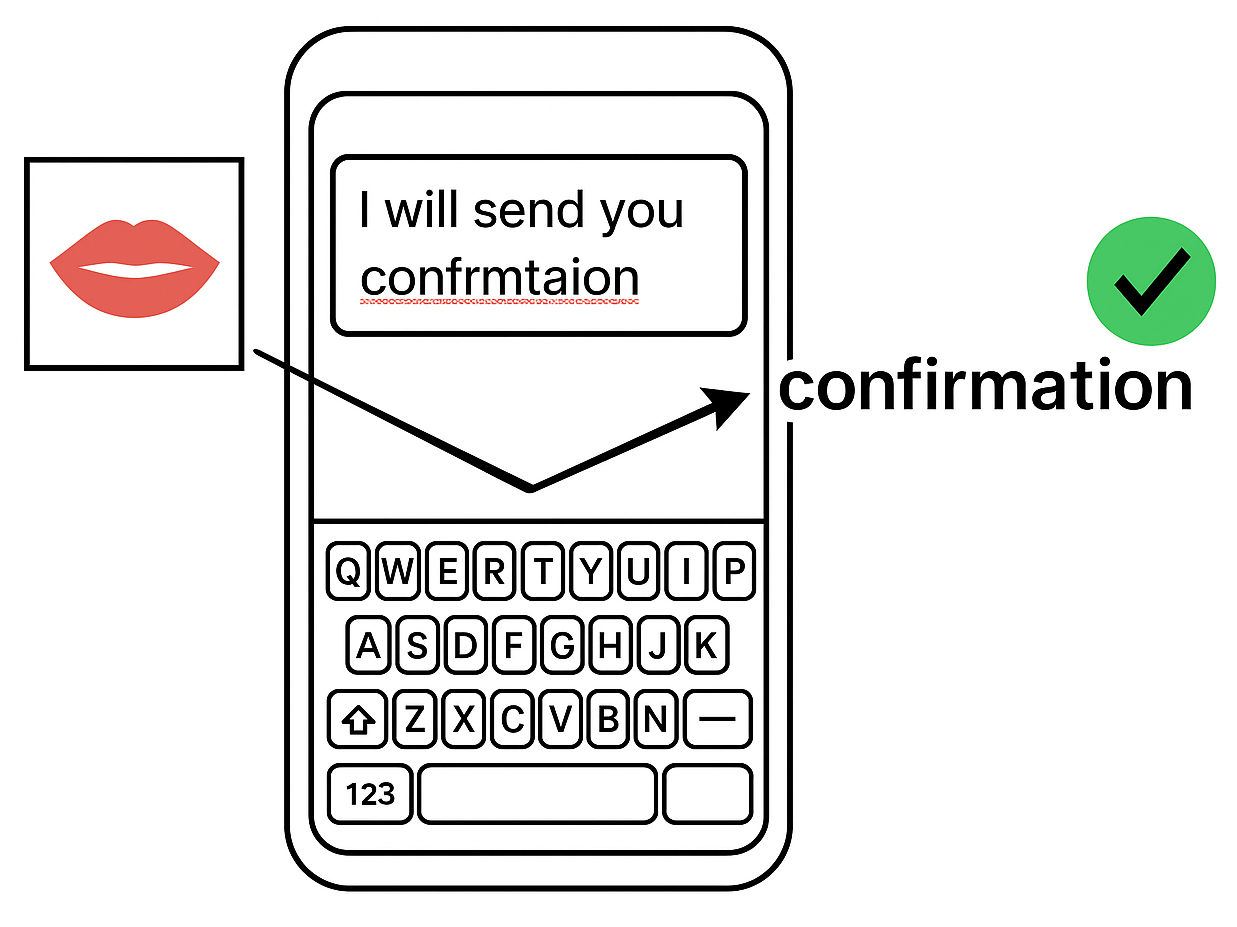
LipConfirm pairs your typing with barely audible whispers at normal typing distance to help guide autocorrect.
A whisper too faint for reliable dictation from where you type may still provide useful clues when combined with your text. There’s no need for an accessory microphone or to bring the phone to your mouth.
U.S. continuation application 19/732,429 allowed with all 22 claims on September 29, 2026.
A middle ground between careful typing and dictation
Typing carefully on mobile takes attention, and autocorrect can still choose the wrong word. Constantly checking the text or stopping to repair mistakes can be frustrating and interrupt what you want to say.
Dictation offers another route, but speaking aloud takes energy and effort. You may be tired, want to avoid disturbing others, or prefer privacy and not having your message overheard. Even when you are alone, you may simply not feel like speaking an entire message.
If you’ve chosen to type quietly, speaking aloud just to correct a word can work against that choice. A faint whisper offers a quieter possibility, but reliable whisper dictation can depend on having the microphone close to your mouth. Without a headset mic, that may mean bringing the phone closer instead of keeping it at a comfortable typing distance.
LipConfirm explores a middle ground: type as you usually do at normal typing distance, but let faint, barely audible articulation support autocorrect. It is designed to use the phone’s built-in microphone, without requiring earbuds, an external microphone, or holding the phone up to your mouth. A faint cue can accompany words as you type, or help correct an individual word afterward.
Phone stays at normal typing distance
If you have ever faintly articulated words while reading to yourself or working through instructions, the action may already feel familiar. LipConfirm’s founding idea grew from that observation and a personal frustration with autocorrect. You already know the word you intend; your typing and faint articulation can express it together, in your own rhythm.
The key technical distinction is that the whisper need not be reliably transcribable by itself at normal typing distance. Your typing already narrows the possibilities. Combined with your text, even incomplete acoustic clues can help distinguish the intended word. The goal is more forgiving typing: less pressure to hit every key perfectly, fewer interruptions to repair text, and more attention left for what you want to say.
You don’t have to whisper throughout your message. For a requested correction, select the word and quietly articulate what you intended, with the phone still at normal typing distance. LipConfirm is designed to combine that new cue with the text you originally typed, rather than relying only on autocorrect’s replacement. Alternatively, you can accompany your typing with faint articulation, still at normal typing distance, to help preempt autocorrect errors and the frustration of stopping to fix them.
Very faint whispers can be less audible to people nearby, helping you correct text more discreetly without speaking up.
LipConfirm also supports completely silent lip movements as an alternative signal. Whisper assistance uses the microphone and does not require a camera. Optional silent lip assistance uses a brief, requested camera capture to follow mouth movements.
Desktop prototypes are available for both whisper-assisted and silent lip-assisted correction, with live demonstrations on request.
Try the interactive demo
See how typing and a faint whisper can reinforce one another. These preset examples illustrate how supporting evidence can help identify an intended word. The same mechanism can support cues during typing or a new cue supplied for a requested correction. You can also explore silent lip assistance.
Intended text
restaurant
Mistyped text
Signal off
Correction
…
How the correction is chosen
Two distinct correction strategies
Generate candidates from typing first, then use lip or whisper evidence to rescore and select.
1. Candidates
2. Evidence
3. Scores
4. Commit
Typing…
Auxiliary evidenceOff
Multimodal modelWaiting for typing
Candidate ranking
Illustrative scores · 0–100
Typing only · no auxiliary evidence
RankCandidateCommit 75Score
Type the word to see its candidates.
Waiting for the mistyped word.
Illustrative simulation. No microphone or camera is accessed.
Typing stays primary in this simulation. Whisper and lip cues guide correction rather than provide a standalone dictation or lipreading result. A single articulation can supply both cues in a combined implementation; combined capture is not simulated here.
Why LipConfirm
Why another cue helps
Even LLM-informed autocorrect can struggle with garbled input or a typo that produces another valid word, such as a slip from “love” to “live” or “this” to “thus”. A quiet cue together with your typing adds evidence of what you intended, beyond what spelling and context alone can establish.
A faint whisper
A faint whisper combined with your typing can be more useful than the same ambiguous whisper alone. Partial clues, such as syllable rhythm or a distinguishing vowel, can help infer the intended word when evaluated together with your typing. LipConfirm uses that evidence without requiring a reliable standalone transcript. Whisper assistance needs no camera.
Silent lip movement
The same supporting role can be supplied by silent articulation. LipConfirm can evaluate visible lip shapes and movements corresponding to words (visemes) alongside your typing. Ongoing lip assistance requires camera capture during the assisted typing period; an individual requested correction can use a brief capture. Faint-whisper assistance offers a camera-free alternative.
Support the flow or the repair
Faintly articulate words as you type, across a phrase or a whole message, so supporting evidence is available without first noticing an error. You can also use assistance selectively or add a cue afterward to reconsider a word.
Why not just whisper during dictation?
Faint-whisper dictation can work well when the microphone is close to your mouth. LipConfirm addresses a different situation: you have chosen to type, your phone is at normal typing distance, and you may not be wearing a headset. A whisper that transcribes reliably up close may not produce a reliable result from where you type.
LipConfirm is designed to combine the acoustic clues captured at that distance with your original typed input. The whisper does not have to identify the intended word on its own. It can accompany typing or help reconsider a word after you notice an error, without requiring you to bring the phone to your mouth or switch to dictating the message.
Try a faint-whisper check on your phone
Open your usual keyboard’s dictation mode. Hold the phone near your mouth and faintly whisper (barely audible) “I love my life here” at a comfortable, low-effort volume. Notice whether it transcribes correctly.
Move the phone to your normal typing distance. Repeat the same sentence, keeping your faint barely audible whisper effort as similar as possible.
Compare the results. Does a whisper that worked up close now produce substitutions, missing words, or no text?
Results vary by device, app, and setting. This check illustrates the difference between microphone positions; it does not, by itself, demonstrate LipConfirm’s correction accuracy.
A faint cue can still carry useful information.
LipConfirm combines that uncertain signal with your typing to help resolve the intended word as you compose. The whisper need not be clear enough to identify the word on its own. For a silent alternative, camera capture can supply lip evidence throughout an assisted typing session or for an individual requested correction.
Potential accessibility applications. LipConfirm may also make correction easier for people who can type but find repeated backspacing or precise cursor placement difficult. For users who can articulate words but have difficulty producing audible speech, silent lip movements could provide another way to clarify an intended word. The choice of cue can be matched to the user’s abilities and preferences.
20 examples where an extra cue can help
Typing errors can leave a word garbled or turn it into another valid word. A faint whisper or silent lip movement accompanying your typing can add evidence to help identify what you intended. See what the cue contributes in selected examples below.
UIO sit side by side on a QWERTY keyboard. That makes pairs such as love/live, this/thus, if/of, and pick/puck easy to mistype. These tiny slips can be frustrating because a real word may pass a spelling check, and context does not always rescue the mistake. Faster or less precise typing can also leave a word garbled, making the intended spelling harder to recover from the typed letters alone.
10 isolated word examples
#
You meant
Typed by mistake
01
love
live
02
this
thus
03
if
of
04
shirt
short
05
pick
puck
06
restaurant
restrant
07
avocado
abcado
08
appointment
apointmrnt
09
prescription
prescriotn
10
accommodation
acxomodatn
10 short sentence examples
#
You meant
Typed by mistake
11
I love my life here.
I live my life here.
12
I left it in the car.
I left it on the car.
13
I like the shirt dress.
I like the short dress.
14
We discussed the renovation.
We discussed the renovstn.
15
Please bring the coat.
Please bring the boat.
16
The team is ready.
The tea is ready.
17
Please send the confirmation.
Please send the confrmatn.
18
I’ll go with the latte.
I’ll go with the latter.
19
It’s a casual relationship.
It’s a causal relationship.
20
What about Wednesday?
What about wrfnesdy?
In the valid-word examples, both versions are grammatical but mean different things. A language model can favor one, yet still miss your intent.
What the cue contributes
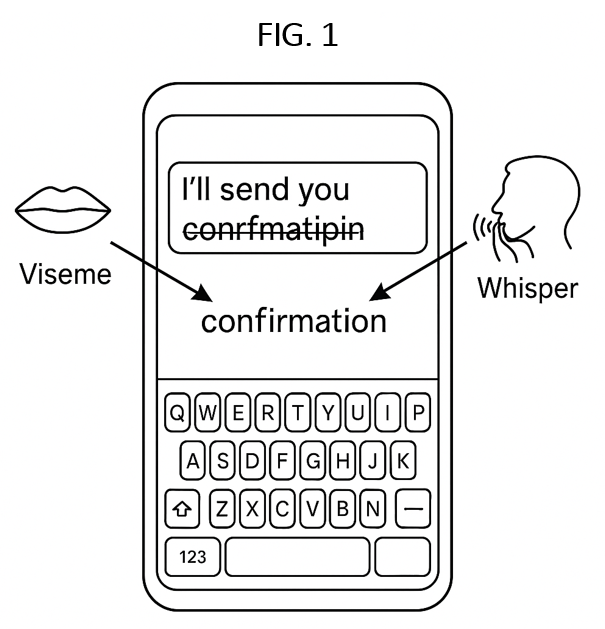
A cue need not reveal the whole word to help resolve it. Even faint whispers often carry clues to syllable count, rhythm, critical vowel or consonant sounds (phonemes), and timing. Optional camera capture can add visemes, visible lip shapes associated with speech sounds, such as closure or rounding, and the movements between them. LipConfirm combines the available cues with the typing to help infer the intended word; audio and lip evidence can also reinforce one another.
Whisper · A distinguishing vowel
love / live, this / thus
In “I love my life here,” a faint “uh” vowel cue can favor love over live, pronounced “liv.” The same vowel contrast helps separate thus from this. Within each pair, the consonants and syllable count match. The typing narrows the choice; the vowel adds evidence context may lack.
Whisper · Recovering garbled typing
avocado / abcado
If you type abcado but whisper avocado, the surviving letters still provide part of the word’s structure. The whisper can add vowel sounds and syllable rhythm that the garbled spelling does not preserve. LipConfirm can evaluate both together, including in a multimodal model that infers the word directly from the combined inputs. The whisper need not identify the word on its own.
Silent lips · An ending the text missed
team / tea
If you type “The tea is ready” but articulate team, the lips close for the final “m.” A captured closure timed to that word ending can support team over tea. LipConfirm can weigh that visible cue alongside the shared typed letters; a resting mouth closure alone would not establish the word.
Whisper or lips · A different beginning
coat / boat
A captured initial “k” sound can favor coat over boat. In the other direction, boat begins with a “b” made by closing and releasing both lips, while “k” is formed farther back in the mouth. A captured lip closure and release at the word’s start can support boat when evaluated together with the typing.
Whisper · Syllable pattern and timing
casual / causal
When casual is articulated with three syllables, its rhythm differs from the usual two syllables of causal. The vowel and middle consonant sounds also differ. LipConfirm can weigh those clues against the nearly identical typed letters. Pronunciation varies, so syllable count is supporting evidence rather than a fixed rule.
Whisper or silent lips · A distinguishing vowel
if / of
These words differ by the neighboring “i” and “o” keys. Their vowel visemes can also differ: the “ih” in if can have a different visible shape from the more open vowel in a fully articulated of. LipConfirm can weigh that shape and its transition into the final consonant against the typing, with whisper audio when available. The visible contrast depends on pronunciation and articulation.
These walkthroughs illustrate how cues can support correction. Pronunciation and capture quality determine which evidence is available. When the combined evidence is insufficient, LipConfirm can retain the typed word or offer alternatives.
How it works
LipConfirm is designed to bring typed input and supporting whisper or lip evidence into existing keyboard, autocorrect, spell-checking, and language-model infrastructure. Technical demonstrations and IP discussions available. Desktop prototypes cover both whisper-assisted and lip-assisted correction.
Capture supporting evidence as you type or on request
During a user-enabled typing session, LipConfirm associates whisper or lip evidence with the text being entered. For a requested correction, a new capture supplies evidence for the selected word. The design retains the original typing so that the new cue can be evaluated alongside what you entered, not merely the replacement displayed by autocorrect. A reliable standalone transcript is not required.
Two ways to combine the inputs
Rerank candidates: Start with suggestions generated from typing, then use whisper or lip evidence to rescore or extend those candidates.
Infer with a multimodal model: Evaluate typing and whisper or lip evidence together in a learned model to infer the intended word. The word need not already appear in a separate autocorrect list.
Suggest, confirm, or replace
The combined evidence can update a suggestion, confirm a word, or correct a valid word that was typed unintentionally. Confidence controls matter for familiar words as well as garbled input: when the evidence is insufficient, the system can retain the text or offer alternatives.
How faint whisper cues reach correction
A faint whisper often retains useful clues to syllable count and rhythm, critical vowel or consonant sounds (phonemes), and sound timing. LipConfirm evaluates the available acoustic evidence together with the original typing, including garbled text. The whisper need not identify the word independently: a partial cue can help resolve the intended word when combined with the typing. A desktop demo of whisper-assisted correction is available.
The capture path must preserve that weak signal. Depending on the system, speech-detection gates or audio filtering can exclude faint utterances before they reach recognition. A user-enabled typing session or requested capture can provide a path for evaluating the retained acoustic evidence with the text. A blank dictation result alone does not identify which stage failed.
Sources: whispered speech
Phonetic background: research on whispered speech documents vowel resonances and sound durations despite the absence of normal vocal-fold vibration. This helps explain why incomplete acoustic evidence can remain informative; it does not establish a minimum usable volume for LipConfirm.
How visemes help resolve typed words
Whisper remains the primary auxiliary cue. If you prefer not to whisper at all, LipConfirm can use the camera to track your silent lip movements throughout an assisted typing session or during a brief requested capture. It is designed to recognize visemes, the transitions between them, and visual syllable patterns such as the rhythm of mouth opening and closing. These provide alternative visual evidence to evaluate alongside the original typing.
The table below shows examples of visemes detected by the current LipConfirm desktop demo.
Viseme category
Visible pattern and example sounds
CLOSED Bilabial
Both lips meet, as for /p/ in pat, /b/ in bat, and /m/ in mat.
LABIODENTAL
The lower lip contacts the upper teeth, as for /f/ in fan and /v/ in van.
SPREAD
The lips spread for an “ee” sound, /iː/, as in see.
OPEN
The mouth opens for an “ah” sound, /ɑ/, as in father.
ROUNDED
The lips round or protrude for “oo,” /uː/, as in food, or “oh,” /oʊ/, as in go.
MID
A relaxed, moderately open mouth shape for “ih,” /ɪ/, as in sit or if.
LipConfirm can combine these shapes, their transitions, and visual syllable patterns with the typed letters. For example, a final CLOSED shape can support team over tea; a SPREAD or MID vowel shape can help separate words with “ee” or “ih” sounds.
These references provide background for the visual speech cues and articulation described above. LipConfirm’s preliminary correction results are described separately in the accuracy FAQ.
Without LipConfirm
With LipConfirm
What the videos show
The videos show lip-assisted correction. The user articulates “confirmation” while entering that word. LipConfirm evaluates the captured mouth movements alongside the mistyped text to help identify the intended word.
Whisper-assisted correction uses microphone audio as another source of supporting evidence. A combined implementation can evaluate both signals with typing; the presence of a camera feed does not itself demonstrate whisper-audio processing.
Assistance can accompany selected words during typing. A requested correction can instead pair a new cue with the retained original typing for that word.
Without LipConfirm
With LipConfirm
What the videos show
The videos show lip-assisted correction. The user articulates “confirmation” while entering that word. LipConfirm evaluates the captured mouth movements alongside the mistyped text to help identify the intended word.
Whisper-assisted correction uses microphone audio as another source of supporting evidence. A combined implementation can evaluate both signals with typing; the presence of a camera feed does not itself demonstrate whisper-audio processing.
Assistance can accompany selected words during typing. A requested correction can instead pair a new cue with the retained original typing for that word.
Patent & IP
U.S. Patent No. 12,737,540 issued September 15, 2026, with all 30 claims. The patent addresses methods for combining typing with whisper audio, lip movements, or both to help identify the words a user intends.
U.S. continuation application 19/732,429 has been allowed with all 22 claims. The USPTO mailed the Notice of Allowance on September 29, 2026. Patent issuance is pending.
A second U.S. continuation application remains pending, seeking additional protection with particular emphasis on whisper-assisted autocorrect.
PCT/US2026/035963 is pending. The USPTO, acting as the International Searching Authority, issued a written opinion with positive novelty, inventive-step, and industrial-applicability findings for all 30 claims. The international search report contains no category X or Y citations.
FIG. 1 — Typed input fused with viseme (lip) and optional whisper signals to select the intended word.
FAQ
Why not just use whisper dictation?
Whisper dictation can work when the microphone is close to your mouth. LipConfirm explores assistance from where you normally type, using your phone’s own microphone. At that distance, a comfortable faint whisper may be insufficient for reliable dictation but still provide useful clues when combined with your text. Typing remains primary, whether the cue accompanies a word as you enter it or helps repair an error afterward.
Can typing plus a faint whisper be more accurate than that whisper alone?
LipConfirm is showing that combining faint whisper cues with typed input can help identify the intended word, including when the typing is garbled. These are early findings from selected desktop demonstrations. A representative accuracy percentage across users, devices, noise levels, and normal phone typing distances has not yet been established. Broader evaluation needs to count both recovered words and unwanted corrections.
Does this apply only to hard-to-spell words?
No. Familiar words can be mistyped into other valid words, including love/live and this/thus. “I love my life here” and “I live my life here” are both grammatical, so even a strong language model may not settle the user’s intent from context alone. A whisper or lip cue can supply additional evidence; confidence checks determine whether to change the word.
What if dictation does not recognize my faint whisper?
A blank or incorrect dictation result does not necessarily mean the microphone captured nothing useful. At normal typing distance, a faint whisper may still leave acoustic clues that become more informative when evaluated with your original typed input. LipConfirm is designed to use those clues without requiring a reliable standalone transcript. When the combined evidence is insufficient, the system can leave the text unchanged or offer alternatives. Try the faint-whisper check above to compare dictation at close range and at your usual typing distance.
Does faint-whisper assistance keep a message private?
Faint articulation can be less audible to people nearby than ordinary speech, but it is not a guarantee against being overheard or recorded. If you articulate a whole message, the audio may contain information about that whole message. Silent lip assistance is an alternative when you do not want to produce audible speech.
For data privacy, the architecture supports local processing and discarding raw audio or mouth-region frames. The host platform determines the implemented data handling.
What is whisper-level audio?
Here, whisper-level audio means quiet acoustic evidence, including faint, low-amplitude or breathy speech. The aim is to use comfortable, barely audible articulation in your natural typing rhythm while keeping the phone where you normally type. LipConfirm evaluates that evidence with the typed input; a complete, correct standalone transcript is not required. Usable volume depends on capture settings, microphone distance, background noise, and the model.
Does LipConfirm require a camera?
No. Whisper-assisted correction combines microphone input with typing and does not need a camera. Optional lip assistance can provide a silent cue or reinforce a quiet utterance.
Does silent lip assistance require ongoing camera use?
For ongoing lip-assisted typing, the camera needs to capture mouth movements during the assisted period. For an individual requested correction, a brief capture can be enough. Whisper-assisted typing does not require a camera.
Can I use faint articulation throughout a message?
Yes. The architecture supports ongoing whisper-assisted typing during an opted-in session. You can faintly articulate each word in your natural typing rhythm, use the extra input only for part of a message, or request help with an individual word. There is no requirement to articulate every word.
Can I correct a word after it appears?
Yes. The design supports selecting a word and requesting a correction, then faintly whispering the intended word with the phone still at normal typing distance. LipConfirm combines that new cue with the retained original typing, even if autocorrect has already replaced what you entered. The microphone can capture the cue just for that request. Alternatively, a brief camera capture can support completely silent lip movement.
Can whisper and lip cues work together?
Yes. One quiet articulation can supply audio and lip cues. The architecture combines both with typed evidence and adjusts their influence according to reliability. An unavailable or unreliable channel can contribute less or be omitted.
What is demonstrated today?
Desktop demonstrations of whisper-assisted and lip-assisted correction are available. The website demo is an illustrative simulation with preset examples and scores; it does not capture live audio or video. The proposed continuous typing experience builds on these mechanisms. Its effects on accuracy, speed, effort, and user preference still need broader evaluation.
Does this require the internet or cloud processing?
LipConfirm is designed to support on-device correction without sending raw mouth-region frames or audio to the cloud. Raw sensor data can be discarded after feature extraction or scoring. Deployment choices depend on the host platform and model.
Will this drain battery or slow down typing?
The design supports session-based or requested microphone capture, with camera capture only for lip assistance. Ongoing lip assistance uses the camera during the assisted typing period; individual requested corrections can use brief captures. Actual battery use and latency depend on capture duration, sensor settings, recognition models, and the device.
How does the extra evidence enter autocorrect?
LipConfirm can rescore or extend suggestions generated from typing, or infer a correction through a learned multimodal model that evaluates the inputs together. A proxy-string pathway can turn speech-related clues into spelling-like inputs for an existing correction engine. The interactive demo illustrates late and early fusion as two distinct strategies.
Do I need to perfectly mouth the words?
Text-assisted correction can use partial cues, such as syllable patterns and mouth shapes, rather than independently recognizing every word from lips alone. Useful visual evidence still depends on articulation and capture quality. Optional personalization can adapt scoring to a user.
Is LipConfirm only for mobile phones?
The architecture supports keyboard-based correction on phones, tablets, desktop systems, wearables, and extended-reality devices. Each platform can use the available, user-permitted combination of typed, acoustic, and visual evidence.
Will I still see suggestions?
A high-confidence result can be inserted or confirmed automatically. When the evidence is uncertain, the system can offer alternatives, retain the current text, or wait for another cue. The user does not need to see the internal candidate scores or camera feed.
Is this patented?
Yes. U.S. Patent No. 12,737,540 issued September 15, 2026, with all 30 claims. U.S. continuation application 19/732,429 has also been allowed with all 22 claims; patent issuance is pending. A second U.S. continuation remains pending, seeking additional protection with particular emphasis on whisper-assisted autocorrect. A PCT international application is also pending. See Patent & IP for details.
Contact
For a live demonstration, technical questions, or partnership discussions, get in touch.
LipConfirm was conceived and developed by Andre Persidsky, a multidisciplinary engineer and inventor with experience building, patenting, and licensing technology. Andre has previously licensed technology to commercial partners including Spotify, and has led hardware/software health-technology projects in collaboration with external research institutions.
 LipConfirm